
Welcome to Sleazy Fork, a site for adult user scripts.
युझर स्क्रिप्ट काय असतात?
User scripts put you in control of your browsing experience. Once installed, they automatically make the sites you visit better by adding features, making them easier to use, or taking out the annoying bits. The user scripts on Sleazy Fork were written by other users and posted to share with the world. They're free to install and easy to use.
पाऊल 1 - एखादे युझर स्क्रिप्ट व्यवस्थापक इंस्टॉल करा

युझर स्क्रिप्ट वापरण्याच्या आधी एक युझर स्क्रिप्ट व्यवस्थापक इंस्टॉल करणे आवश्यक आहे. .तुम्ही कोणता युझर स्क्रिप्ट व्यवस्थापक वापरू शकता हे तुम्ही वापरणार्या ब्राउझरवर अवलंबून आहे.
डेस्कटॉप मोबाइल (अँड्रॉइड) मोबाइल (iOS)
- Chrome: Tampermonkey
- Firefox: Greasemonkey, Tampermonkey, or Violentmonkey
- Safari: Tampermonkey or Userscripts
- Microsoft Edge: Tampermonkey
- Opera: Tampermonkey or Violentmonkey
- Maxthon: Violentmonkey
- AdGuard: (no additional software required)
- Firefox: Greasemonkey, Tampermonkey, or Violentmonkey
- Microsoft Edge: Tampermonkey
- Maxthon: Violentmonkey
- Dolphin: Tampermonkey
- UC: Tampermonkey
- XBrowser
- Safari: Tampermonkey किंवा Userscripts
- Gear: (कोणत्याही अधिक सॉफ्टवेअरची गरज नाही)
पाऊल 2 - युझर स्क्रिप्ट इंस्टॉल करा
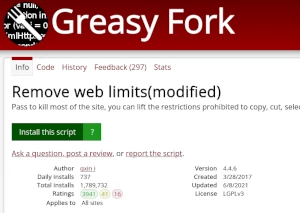
Browse this site to find a user script you want to try. Here is a sample of the most popular scripts:
- WebPlay for ytdl - Show WebPlay play button on some ytdl protocol supported pages
- 【超星学习通小助手】【视频、答题助手】【完全免费】视频-章节测试|自动挂机|防清进度|不占资源 - 💯超星学习通满分助手,挂机解放时间,无需任何操作自动完成所有任务点【💻可最小化💻】🆒支持超星视频、文档、答题、自定义正确率、掉线自动登录🤘取消视频文件加载,多开也不占用网速,放心追剧🍊自定义答题正确率,提高学习效率🍆每日功能测试,在发现问题前就解决问题,防清进度,无不良记录
- नुकतेच 18 वर्षांचे झाले - मी नुकताच 18 वर्षांचा होतो, म्हणून मी प्रौढ सामग्री पाहू शकतो
- JAV 添加跳转在线观看 - 为 JavDB、JavBus、JavLibrary、JMVBT 等站点添加跳转在线观看的链接
- NAI V4.5 Chat Simulator Bridge - Generates NAI V4.5 images for Chat Simulator. Reads metadata from hidden DOM nodes, injects results back into bubbles.
Once you've found a user script, click the green install button on the user script's page, and your user script manager will ask you to confirm the install.
पाऊल 3 - युझर स्क्रिप्ट वापरा
Go to the site the user script affects. It should automatically do its thing. After trying out the user script for a while, go back to where you installed the user script and leave some feedback for the user script's author.