
What are user scripts?
User scripts put you in control of your browsing experience. Once installed, they automatically make the sites you visit better by adding features, making them easier to use, or taking out the annoying bits. The user scripts on Sleazy Fork were written by other users and posted to share with the world. They're free to install and easy to use.
Step 1: install a user script manager

To use user scripts you need to first install a user script manager. Which user script manager you can use depends on which browser you use.
Desktop Mobile (Android) Mobile (iOS)
- Chrome: Tampermonkey
- Firefox: Greasemonkey, Tampermonkey, or Violentmonkey
- Safari: Tampermonkey or Userscripts
- Microsoft Edge: Tampermonkey
- Opera: Tampermonkey or Violentmonkey
- Maxthon: Violentmonkey
- AdGuard: (no additional software required)
- Firefox: Greasemonkey, Tampermonkey, or Violentmonkey
- Microsoft Edge: Tampermonkey
- Maxthon: Violentmonkey
- Dolphin: Tampermonkey
- UC: Tampermonkey
- XBrowser
- Safari: Tampermonkey or Userscripts
- Gear: (no additional software required)
Step 2: install a user script
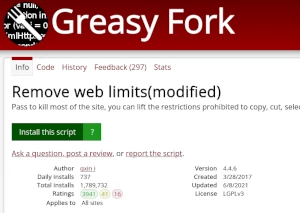
Browse this site to find a user script you want to try. Here is a sample of the most popular scripts:
- XVIDEOS Customised Features - Adds some features: is video on favorites, download button, video player in thumbnail...
- Xhamster - AUTO Video Infinite LOOP v.12 - Video Auto Infinite Replay Add too Moment Video- Fix by smartacephale (https://greasyfork.org/fr/scripts/493935-xhamster-improved)
- Remove Sankaku Advertisements/Iframes - Hopefully removes all ads from *.sankaku
- xvideos push download - 1. Automatic playback 2. Automatic widescreen 3. High-quality playback 4. Click to push the next movie 5. Download thumbnails
- NAI V4.5 Chat Simulator Bridge - Generates NAI V4.5 images for Chat Simulator. Reads metadata from hidden DOM nodes, injects results back into bubbles.
Once you've found a user script, click the green install button on the user script's page, and your user script manager will ask you to confirm the install.
Step 3: use the user script
Go to the site the user script affects. It should automatically do its thing. After trying out the user script for a while, go back to where you installed the user script and leave some feedback for the user script's author.