
Welcome to Sleazy Fork, a site for adult user scripts.
What are user scripts?
User scripts put you in control of your browsing experience. Once installed, they automatically make the sites you visit better by adding features, making them easier to use, or taking out the annoying bits. The user scripts on Sleazy Fork were written by other users and posted to share with the world. They're free to install and easy to use.
Step 1: install a user script manager

To use user scripts you need to first install a user script manager. Which user script manager you can use depends on which browser you use.
Desktop Mobile (Android) Mobile (iOS)
- Chrome: Tampermonkey
- Firefox: Greasemonkey, Tampermonkey, or Violentmonkey
- Safari: Tampermonkey or Userscripts
- Microsoft Edge: Tampermonkey
- Opera: Tampermonkey or Violentmonkey
- Maxthon: Violentmonkey
- AdGuard: (no additional software required)
- Firefox: Greasemonkey, Tampermonkey, or Violentmonkey
- Microsoft Edge: Tampermonkey
- Maxthon: Violentmonkey
- Dolphin: Tampermonkey
- UC: Tampermonkey
- XBrowser
- Safari: Tampermonkey or Userscripts
- Gear: (no additional software required)
Step 2: install a user script
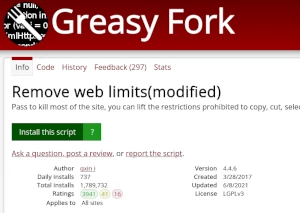
Browse this site to find a user script you want to try. Here is a sample of the most popular scripts:
- Improvements to FetLife's UI - Button to add an event to Google Calendar, visited profile links shown in red, mutual kinks shown brighter, homepage feed enlarged, show pagination at the top of people lists, profile pages show date of last activity plus emoji if user's inactive
- Continue playing MISSAV - Prevents the video from stopping when clicking off-screen.
- Leak Finder Overlay - Adds a convenient overlay to check for "leaks" on various sites.
- LPSG Video Unlocker - Automatically unlocks and enhances your LPSG browsing experience
- E-Hentai Reader Assistant - 🌟Add preloading to e-hentai. 🌟Add click zones (left=prev/right=next) to image sections. 🌟Load images without page reload. 🌟Support keyboard shortcuts. 🌟Support i18n.
Once you've found a user script, click the green install button on the user script's page, and your user script manager will ask you to confirm the install.
Step 3: use the user script
Go to the site the user script affects. It should automatically do its thing. After trying out the user script for a while, go back to where you installed the user script and leave some feedback for the user script's author.